
Licensing and evaluation
Licence management is available to a superuser through Licensing in administration, or the application’s /installation page. The same process applies to Community and Safety / VZD. Use your organization’s application address, not the product website.
Check the installation
Section titled “Check the installation”Open Licensing and check the selected module, ReportHub version, status, validity date and installation ID. Each installation runs one module. The selected module is saved with initial administrator creation; switching modules requires a separate installation, not a setting change.
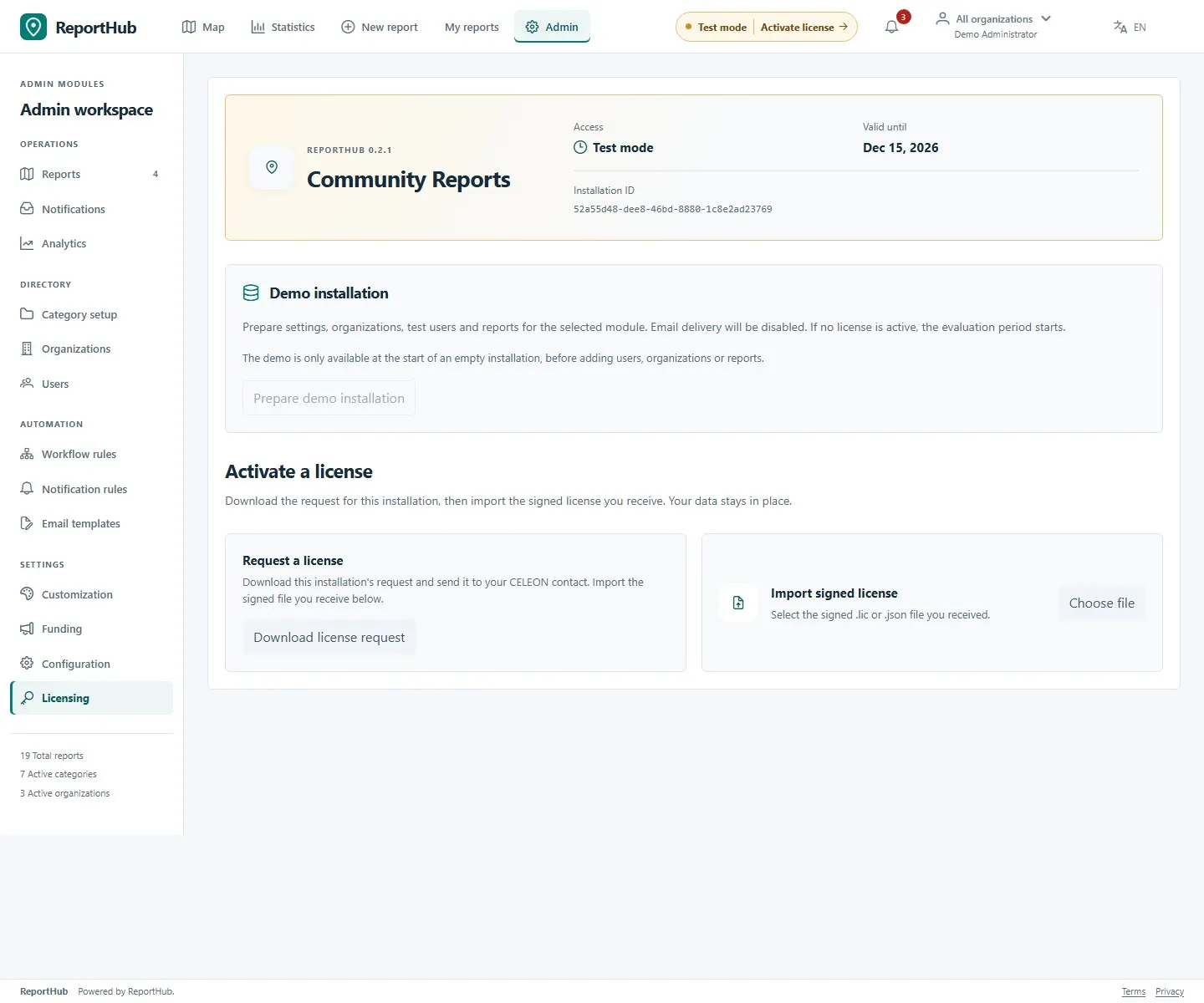
Demo interface
Start the 30-day evaluation
Section titled “Start the 30-day evaluation”- On a fresh installation, select the module and create the initial administrator. See the Docker quickstart.
- Open Licensing and choose Start evaluation. No licence file is needed for evaluation.
- Check that the status shows Test mode and review the validity date. The 30 days begin when evaluation starts, not when containers are downloaded.
- For a populated evaluation, use Prepare demo installation only while the installation is still eligible and empty of operational setup/data. It preserves the initial administrator and disables outgoing mail. Keep demo access restricted.
Restarting the service does not restart evaluation. Use a separate production installation rather than treating demo content or credentials as production configuration.
Request a commercial licence
Section titled “Request a commercial licence”- Choose Download license request in Licensing. Your browser downloads a
.rhreqfile for this installation. - Send the request privately to CELEON through your agreed purchasing/support channel and specify the intended module and commercial arrangement. Contact CELEON if no arrangement exists yet.
- Keep the request associated with the correct instance. Downloading it does not purchase or activate a licence.
The licence is bound to the installation ID and selected module. Two modules need two installations and matching licences. Public availability of the container image does not itself grant production-use rights; the applicable commercial agreement or written approval governs use. See pricing for the current proposal rather than assuming the request screen is a checkout.
Import or renew a licence
Section titled “Import or renew a licence”- Obtain the licence file issued for this installation by CELEON.
- In Licensing, select Choose file in the licence-file panel and choose the supplied
.licor JSON file. Selecting it starts import automatically; do not paste it into a report or edit its contents. - Wait for the result. Recheck the module, status and validity date. A failed import is not activation.
- For renewal, import the replacement licence in the same installation. You can import during or after evaluation; no reinstall is required.
ReportHub checks signature, product, installation ID, module and validity. If import fails, check the selected file and instance, then contact CELEON with the application version and error. Do not send passwords, database dumps or private signing keys.
Expiry and recovery
Section titled “Expiry and recovery”| Situation | Result |
|---|---|
| Active evaluation or valid licence | Module operations are available within the user’s permissions. |
| Expired evaluation or expired valid time-limited licence | Existing reads and exports remain available; submissions and changes stop. |
| Missing, invalid or wrong-module licence without usable evaluation | Module access is denied; installation/authentication remain available for activation. |
Importing a signed licence replaces evaluation access; an expired signed licence does not fall back to evaluation. Storage and service scope are contractual; the technical licence does not impose user/report quotas.
Back up the database: it contains the installation identity and imported licence. Restoring that database preserves the identity; creating an empty database creates a different installation that needs its own matching licence. Do not reset a database to troubleshoot activation.